Are you curious about the technology behind smart lighting? You see the benefits, but the complexity and potential issues might worry you, making it hard to choose the right products.
Smart LED downlights work by embedding a small computer chip into a standard LED light. This chip allows the downlight to communicate wirelessly, usually through Wi-Fi, Bluetooth, or Zigbee. This lets you control the light’s brightness, color, and schedule using a smartphone app or voice assistant.

In my years of manufacturing LEDs, I’ve seen smart technology change everything. We’ve moved from making simple light sources to creating active parts of a home’s environment. This is a huge leap forward, bringing amazing convenience but also new challenges. I’ve helped many partners navigate this shift, and it always starts with a few key questions. To help you source the best solutions for your projects, let’s break down the most common concerns I hear.
Do smart bulbs work without Wi-Fi?
Your project site has unstable Wi-Fi, and you worry the smart lights will fail. Imagine your client’s frustration when their new, expensive lighting system stops working during an internet outage.
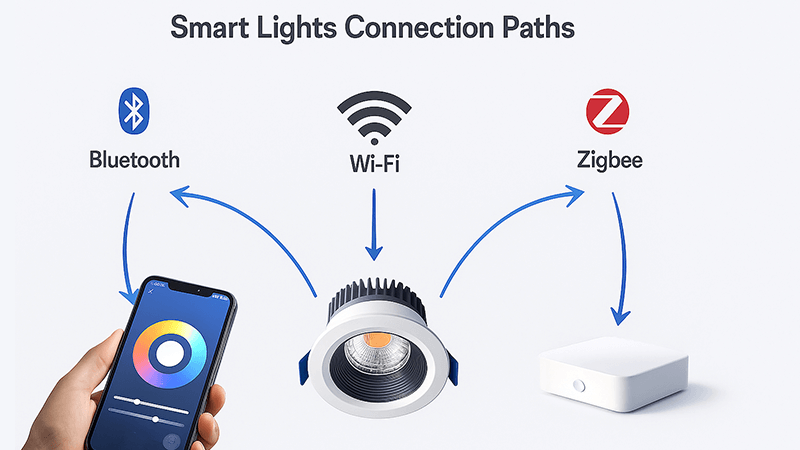
Yes, many smart lights can work without an active internet connection. Bulbs that use Bluetooth can be controlled directly from your phone. Lights using Zigbee or Z-Wave connect to a local hub, which continues to run schedules and scenes even if the internet goes down.
When I first started exploring smart lighting for my clients, this was our biggest concern. One of my first major smart lighting projects was for a hotel in a remote area with spotty internet. The project manager, much like you, was worried that guests would be left in the dark. We had to find a solution that didn’t depend on a constant cloud connection. This experience taught me the critical importance of understanding the different communication protocols. It’s not just about convenience; it’s about reliability.
The answer lies in how the bulb communicates. Let’s look at the main types.
How Bluetooth Lights Provide Direct Control
Bluetooth is the simplest solution for offline control. These smart lights connect directly to your smartphone or a dedicated remote control. Think of it as a personal, short-range network between your phone and the light. As long as you are within range (usually about 30 feet or 10 meters), you can turn the lights on/off, dim them, or change their color. You don’t need a Wi-Fi router or an internet connection for these basic functions. The main limitation is range. You can’t control the lights when you’re away from home.
The Power of a Local Hub with Zigbee and Z-Wave
This is the solution we chose for that hotel project. Zigbee and Z-Wave are protocols designed specifically for smart home devices. Instead of each light connecting to Wi-Fi, they connect to each other, forming a stable "mesh network." This network then connects to a central hub, which is plugged into your router.
Here’s the key: while the hub needs internet for initial setup and remote access from outside the building, it can run most functions locally. Pre-set schedules, scenes, and sensor-triggered actions are stored on the hub itself. If the internet goes down, the hub continues to run these commands without a problem. Your wall switches and local remotes will still work perfectly. This makes Zigbee/Z-Wave systems incredibly robust for commercial and large residential projects where reliability is non-negotiable.
Why Wi-Fi-Only Lights Are Vulnerable
Wi-Fi-only bulbs are popular because they are easy to set up; you just connect them to your existing router. However, they have a critical weakness. Most of them rely on a cloud server to function. When you use your app, the command goes from your phone, to the internet, to the company’s server, and then back to your light bulb. If your internet connection drops, this communication path is broken. The bulb loses its "smart" capabilities and can only be turned on and off with the physical light switch.
| Protocol |
Offline Control |
Range |
Setup Complexity |
Best For |
| Wi-Fi |
No (Relies on cloud) |
Excellent (Router coverage) |
Easy |
Single rooms, simple setups |
| Bluetooth |
Yes (Direct connection) |
Limited (Approx. 10m) |
Very Easy |
Individual lights, small spaces |
| Zigbee/Z-Wave |
Yes (Hub runs locally) |
Excellent (Mesh network) |
Moderate (Hub required) |
Whole-home, commercial projects |
What are the disadvantages of smart LED lighting?
Smart lighting seems like the perfect modern solution. But you know that every technology has its hidden downsides. Overlooking these issues can lead to project delays, unhappy clients, and unexpected long-term problems.
The main disadvantages are the higher initial cost compared to standard LEDs, a dependency on stable wireless networks, and potential cybersecurity and privacy risks. Complexity and compatibility issues between different brands are also significant concerns.
I remember a conversation with a distributor in Europe. He was excited about selling smart downlights but was hesitant. He told me, "Michael, my customers love the idea, but I’m afraid of the support calls. What if they can’t connect them? What if they get hacked?" His fears were valid. As manufacturers, we have a responsibility not just to innovate, but to make that innovation secure and easy to use. Selling a smart product means selling a system, and that system comes with new responsibilities that go beyond just making good light.
Let’s break down these disadvantages so you can address them proactively with your clients.
Higher Initial Cost and System Complexity
The most obvious disadvantage is the price. A smart LED downlight contains a standard LED plus a microchip, radio antenna, and more complex software. This extra hardware naturally increases the manufacturing cost. For a large project, this can significantly impact the budget. Beyond the bulbs themselves, a robust system might require a hub, signal boosters, or upgraded Wi-Fi routers. The setup process can also be more complex. You aren’t just screwing in a bulb; you’re configuring a network device. This can be a hurdle for non-technical users and might require professional installation, adding to the overall cost.
Network Dependency and Reliability
As we discussed, smart lights are network devices. Their performance is directly tied to the quality of the wireless network. A weak Wi-Fi signal, router interference, or an internet outage can render them unresponsive. In a commercial setting like an office or retail store, this isn’t just an inconvenience—it can disrupt business. You must plan the network infrastructure as carefully as you plan the lighting layout. For a purchasing manager like yourself, this means discussing Wi-Fi quality and potential hub requirements with your client early in the process.
Security and Privacy Concerns
This is the hidden risk that concerns me the most. Any device connected to the internet is a potential target for hackers. A poorly secured smart light could become an entry point into a home or business network. Hackers could flicker the lights, or worse, use the light’s connection to access more sensitive data on the network. There’s also the privacy issue. Many smart lighting systems collect data on your usage patterns—when you turn lights on and off. This data, while often used to improve the service, is stored on company servers. You are trusting the manufacturer to protect this data. When choosing a supplier, always ask about their security protocols, encryption standards, and data privacy policy. Choose partners who take security as seriously as you do.
Do smart lights still use electricity when off?
You promise your clients energy savings with LED technology. But you wonder if smart lights, with their constant connectivity, secretly use power even when they’re turned off, undermining your claims.
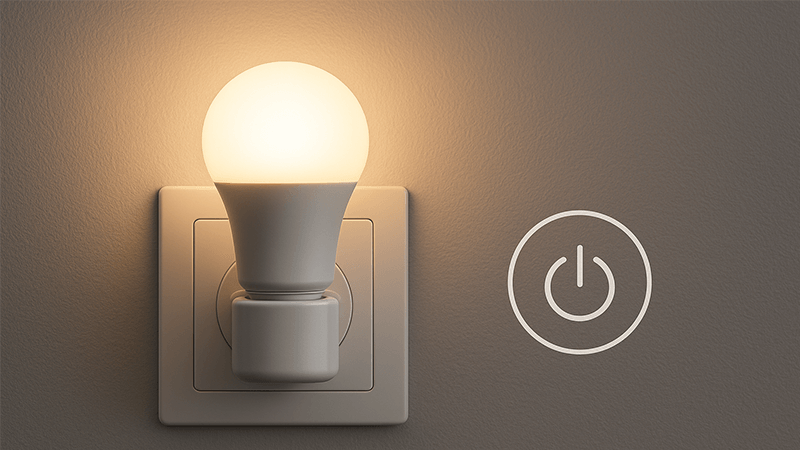
Yes, smart lights consume a small amount of power when they are "off." This is called standby power or "vampire load." The internal chip and radio need to stay powered on to listen for the next command from your app, remote, or hub. This usage is very low.
This question comes up a lot, especially from clients focused on sustainability and energy efficiency. They’ve invested in LEDs to save power, and the idea of a device using electricity 24/7, even in standby, feels counterintuitive. I had a client for a large office building project who required a detailed report on the standby power consumption of every smart downlight. He wanted to calculate the total annual "vampire load" for the entire building. It was a fair request. While the power draw is tiny for one bulb, it adds up. Understanding and explaining this is part of being a transparent and trustworthy partner.
Understanding Standby Power
Think of your television. When you turn it off with the remote, it’s not completely powered down. A small part of its circuitry remains active, waiting for you to press the "on" button again. Smart lights work the same way. The LED part is off and not producing light. However, the tiny computer inside—the part that connects to Wi-Fi or Zigbee—is in a low-power listening mode. It needs this standby power to be ready to receive a command at any moment. Without it, you wouldn’t be able to turn the light on remotely.
How Much Power Do They Use?
The amount of standby power is very small, typically between 0.2 and 0.5 watts per bulb. Let’s put that in perspective. A single 0.5W smart bulb running in standby for a full year would consume about 4.38 kilowatt-hours (kWh) of electricity. Depending on your local electricity rates, this might cost just a few dollars per year. In contrast, the same LED bulb, when on, might use 8-10 watts. The energy saved by dimming the light by just 10% or turning it off automatically when a room is empty far outweighs the minimal standby power cost. So, yes, they use power, but the energy-saving features they enable usually result in a net positive.
Is It a Real Concern?
For a typical home, the cost is negligible. For a large commercial installation with thousands of lights, the total standby load is worth calculating, as my client did. However, it’s important to frame it correctly. Smart lighting’s main energy saving benefit comes from control. It allows for:
- Scheduling: Automatically turning off lights at night.
- Occupancy Sensing: Lights only turn on when someone is in the room.
- Daylight Harvesting: Dimming lights automatically when there is enough natural sunlight.
These features save far more energy than the standby mode consumes. When you present smart lighting to your clients, you should be honest about standby power but emphasize that the system’s intelligence is what delivers the real savings.
What is the difference between smart LED and normal LED?
Your clients understand the value of LEDs. Now you’re introducing smart LEDs, and they ask, "What’s the real difference? Is it worth the extra cost and complexity?" You need a clear answer.
A normal LED is a simple, energy-efficient light source. A smart LED is a computer. It has the same light-emitting diode, but adds a microchip and radio for wireless communication, enabling remote control, automation, and customization.

To me, this is the most fundamental question. For years, my factory focused on making LEDs brighter, more efficient, and longer-lasting. That was the whole game. We perfected the light source. Then, smart technology came along. I realized we weren’t just in the business of illumination anymore; we were in the business of creating experiences. A normal LED simply provides light. A smart LED interacts with your environment. It’s a shift from a passive component to an active node in a connected system. This is the core idea I share with all my partners to help them see the bigger picture.
The Core Components: Light vs. System
Let’s break down the physical and functional differences. A normal LED downlight is a straightforward device. It has an LED chip, a driver to convert AC power to DC, a heat sink to manage temperature, and a housing. Its only job is to turn on when power is supplied and turn off when it’s cut.
A smart LED downlight starts with all of that, but then adds a crucial layer of technology.
- Microcontroller Unit (MCU): This is the "brain" of the bulb. It’s a tiny computer that runs the software.
- Wireless Radio: A chip and antenna for communicating via Wi-Fi, Bluetooth, Zigbee, etc.
- Memory: To store settings like its name, group, and the last color/brightness setting.
This turns the light from a simple electrical device into a node on a network. Its function is no longer just "on/off." It’s "receive command, process command, execute command."
The Functional Divide: Illumination vs. Interaction
The real difference lies in what you can do with them. This is what justifies the extra cost for your clients.
| Feature |
Normal LED Downlight |
Smart LED Downlight |
| Control |
Physical Wall Switch |
App, Voice, Remote, Automation |
| Dimming |
Requires special dimmer switch |
Smooth, precise dimming via app |
| Color |
Fixed (e.g., Warm White, Cool White) |
Adjustable white tones, millions of colors |
| Automation |
None |
Scheduling, scenes, sensor integration |
| Energy Savings |
High efficiency (on/off) |
Enhanced savings through smart control |
| Data & Insights |
None |
Can provide usage data and diagnostics |
A normal LED fulfills the basic need for light. A smart LED transforms lighting into a tool for convenience, security, ambiance, and energy management. When you explain this to a client, you’re not just selling a light fixture. You’re selling a more comfortable, efficient, and responsive living or working space. That is the true difference.
Conclusion
Smart LED technology transforms lighting from a simple utility into an interactive system. Understanding how it works, including its limitations and risks, is key to delivering reliable and secure solutions.